
Seating plans ruin weddings. Not anymore.
Thirty guests. Three tables. The bride’s parents can’t sit with her ex. The groom’s family needs to be mixed in, not clustered. Two vegans shouldn’t end up at the same table or the kitchen loses its mind. The bridal party needs the top table. Great Aunt Margaret is a VIP and will notice if she’s in the back corner.
You’ve been moving names around on a whiteboard for two hours and you’re further from a solution than when you started.
Balanced Allocate handles the politics, the dietary logistics, and the family dynamics simultaneously.
Start Free Trial — 14 days free, no credit card.
30 guests. 3 tables. Families, exes, diets, sides, and VIPs.
James and Sophie are getting married. The seating coordinator has to satisfy all of these at once:
- Bridal party at the top table
- Family members seated together
- Exes at separate tables
- A mix of bride-side and groom-side guests at every table
- No more than 2 vegans or 3 vegetarians per table (kitchen logistics)
- VIPs pulled toward the top table
- Groomsmen and bridesmaids near the couple where possible
- Table sizes between 9 and 14
Moving one guest fixes one problem and breaks two others. The solver doesn’t move guests one at a time — it considers every constraint at once and finds the best arrangement.
How it works in practice
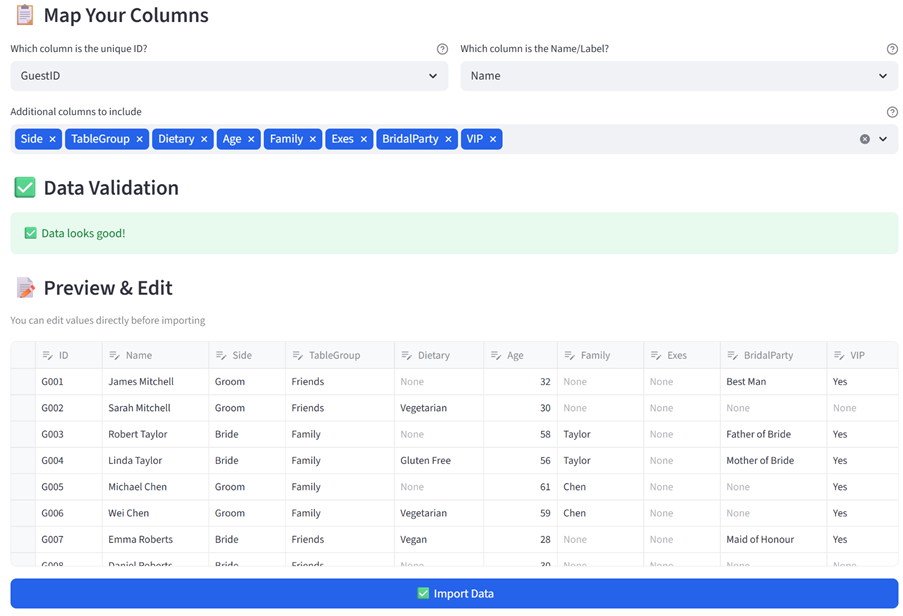
Step 1: Upload your guest list
The same spreadsheet you’ve been agonising over. Guest names, side (bride/groom), dietary requirements, family groupings, ex-partner conflicts, bridal party role, VIP status. CSV or Excel.
Step 2: Set your rules
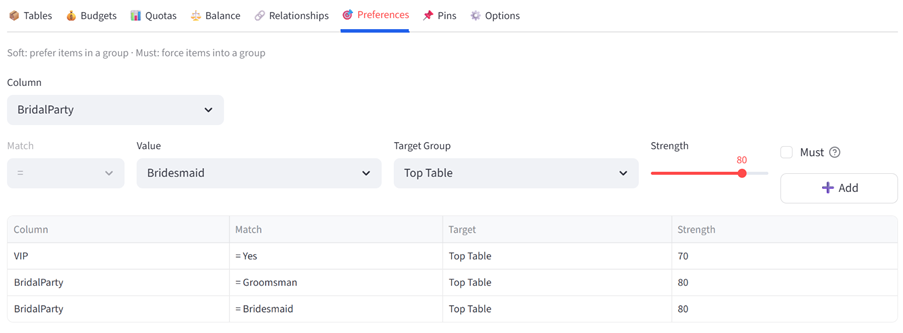
Pin the bridal party to the top table. Relationships: family IDs together, ex IDs apart. Balance: bride-side and groom-side spread evenly. Quotas: max 2 vegans, max 3 vegetarians per table. Preferences: VIPs toward the top table, remaining bridal party toward the top table. Change the terminology to “Guest” and “Table” so the whole interface speaks your language. Five minutes.
Step 3: Get your seating plan
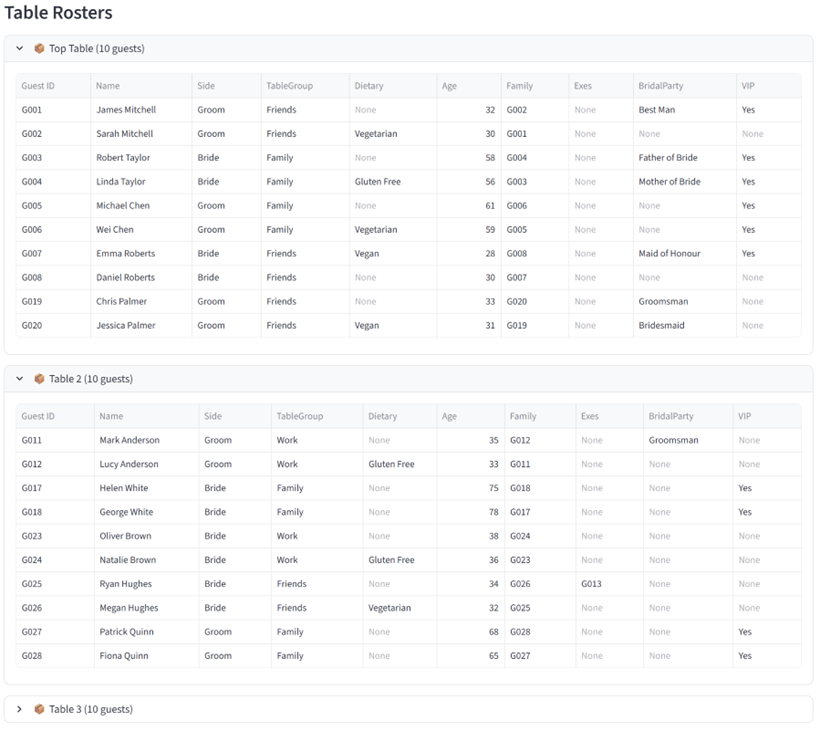
The top table has the bridal party, parents, and VIPs. Each table has a mix of both sides. Family members are together. Tom and Ryan are at separate tables. No table has more than 2 vegans. The groomsmen who didn’t fit at the top table are seated with their partners.
Step 4: Prove it works
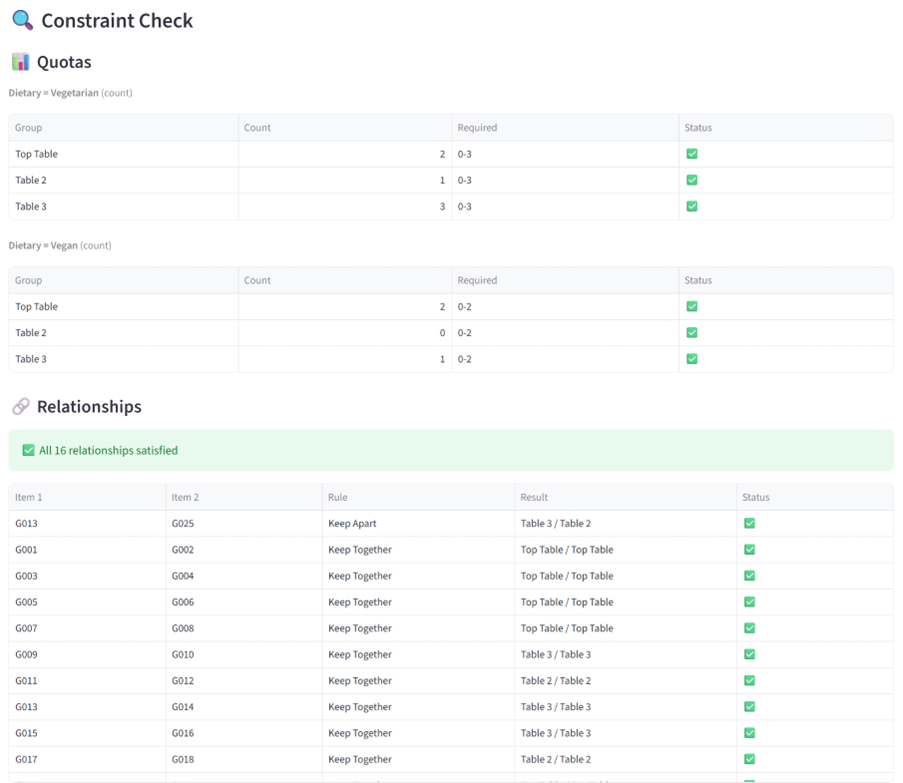
The Validation tab confirms every rule: families together, exes apart, dietary quotas met, sides balanced. The Analytics tab shows the dietary and side distribution across all tables. Export the PDF and hand it to the venue coordinator. Done.
The result
Without Balanced Allocate: three hours, a whiteboard covered in sticky notes, a seating chart that mostly works but puts Uncle Steve next to the one person he shouldn’t be near. Nobody notices until the reception.
With Balanced Allocate: minutes, every constraint satisfied, a printed seating chart the venue can work from. The couple reviews the plan, not the process.
Not just weddings
The same tool handles any event where people need to be placed thoughtfully:
- Conference breakout sessions: Distribute 200 delegates across 10 workshops balanced by company, seniority, and topic preference — with no two people from the same team in the same session
- Corporate gala tables: Seat 150 guests across 15 tables mixing departments, honouring VIP placement, and keeping executive hosts spread evenly
- Fundraiser dinners: Balance donor tiers across tables so every table has a host and a mix of major and emerging supporters
- Festival zone allocation: Assign 60 food vendors across 4 zones balanced by cuisine type, price point, and power requirements
- Staff Christmas party: Form tables that mix departments so people actually meet someone new, while keeping close teams together
Try it yourself
Download the Balanced Allocate User Guide with this, plus additional full examples, walkthroughs, constraints and dataset formats. The data used in this example is also available for download below.
Your data stays in your browser session. Nothing is stored on our servers.
Ready to stop rearranging sticky notes?
Start Free Trial — 14 days free, no credit card.