
Rosters, trucks, and teams don’t care about your spreadsheet
You have 30 nurses and 3 shifts. Each shift needs senior coverage, the right certification mix, and enough patient load hours — but not too many. Two nurses can’t work together. The head nurse must be on days. You build the roster manually, balancing one constraint at a time, and every fix creates a new problem somewhere else.
Balanced Allocate considers every constraint simultaneously and finds the optimal assignment in seconds.
Start Free Trial — 14 days free, no credit card.
Three problems. One tool.
Operational allocation shows up everywhere — shift rosters, fleet loading, desk assignments, project teams. The details change but the structure is identical: distribute people or things into groups while respecting capacity, skill coverage, budgets, and relationships. Here are three real scenarios the tool handles out of the box.
Scenario 1: Shift Scheduling
30 nurses. 3 shifts. Certifications, seniority, patient load, and personality conflicts.
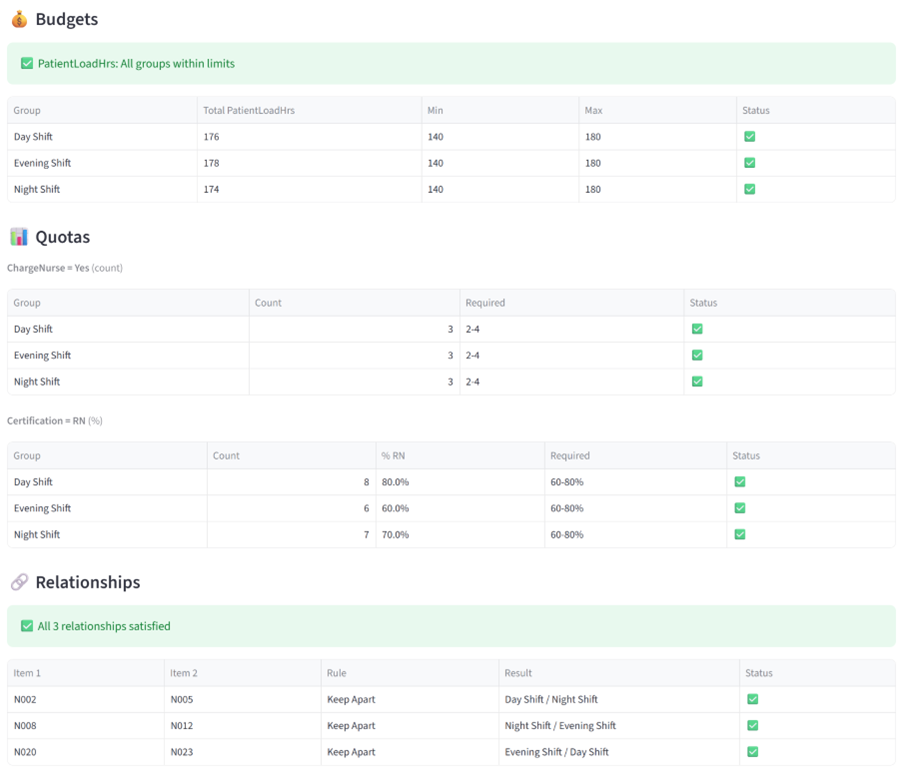
City General Hospital assigns 30 nurses across Day, Evening, and Night shifts. Each shift needs:
- 2–4 Charge Nurses
- 60–80% RNs
- Patient load hours between 140 and 180
- Specialties (Emergency, ICU, Paediatrics, General) spread evenly
- Seniority levels balanced
- Incompatible pairs on separate shifts
- Head nurse pinned to Day
Set up in minutes. Solved in under a second. Every shift has the right coverage, the right experience mix, and no personality clashes.
Three problems. One tool.
Operational allocation shows up everywhere — shift rosters, fleet loading, desk assignments, project teams. The details change but the structure is identical: distribute people or things into groups while respecting capacity, skill coverage, budgets, and relationships. Here are three real scenarios the tool handles out of the box.
Scenario 1: Shift Scheduling
30 nurses. 3 shifts. Certifications, seniority, patient load, and personality conflicts.
City General Hospital assigns 30 nurses across Day, Evening, and Night shifts. Each shift needs:
- 2–4 Charge Nurses
- 60–80% RNs
- Patient load hours between 140 and 180
- Specialties (Emergency, ICU, Paediatrics, General) spread evenly
- Seniority levels balanced
- Incompatible pairs on separate shifts
- Head nurse pinned to Day
Set up in minutes. Solved in under a second. Every shift has the right coverage, the right experience mix, and no personality clashes.
Scenario 2: Fleet Loading
24 packages. 4 trucks. Weight, volume, zones, fragile items, and hazmat.
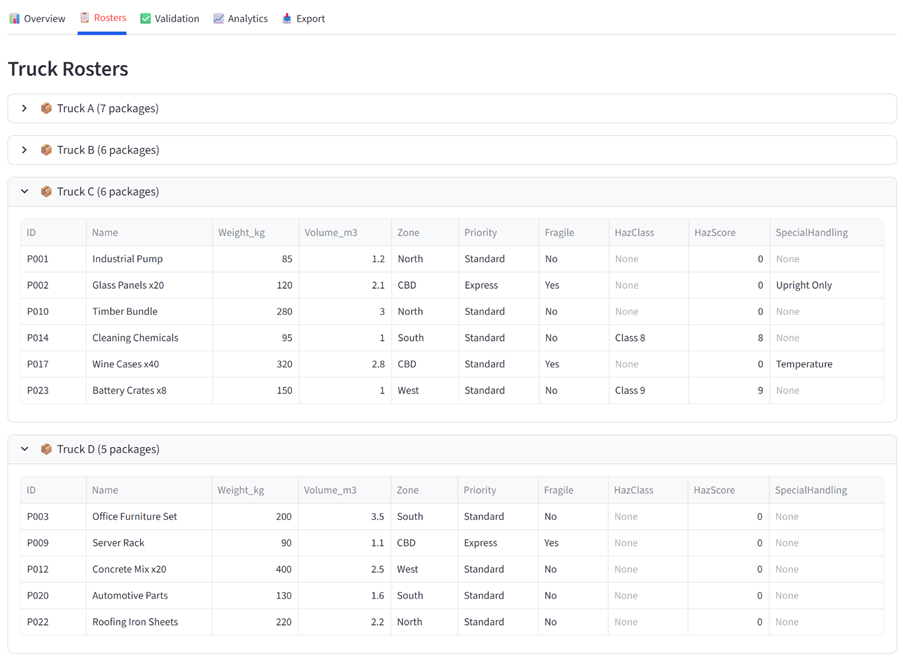
Metro Distribution loads 24 packages onto 4 trucks. Each truck has:
- Max 1,500kg weight
- Max 12.0m³ volume
- No more than 3 fragile items per truck
- Destination zones spread for efficient routing
- CBD and urgent packages prioritised onto Truck A (first departure)
- Hazardous materials minimised on Truck D (oldest vehicle)
Two budget constraints (weight and volume) running simultaneously. A fragile item quota. Zone balancing. Priority preferences. Hazmat minimisation. The solver handles the multi-dimensional packing problem that would take a dispatcher an hour of recalculation every time a package changes.
Scenario 3: Production Line Balancing
24 operators. 4 lines. Certifications, experience, safety scores, and shift preferences.. Certifications, seniority, patient load, and personality conflicts.
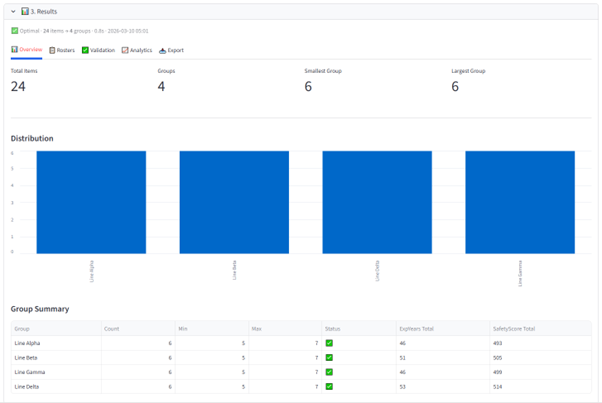
Precision Engineering distributes 24 operators across 4 production lines. Each line needs:
- 2–3 Level 3 certified operators
- Experience years between 30 and 55
- Primary certifications (CNC, Welding, Assembly, Quality) spread evenly
- Safety scores within a specified range per line
- Shift preferences balanced so no line is entirely morning or night staff
Two budgets (experience and safety), a certification quota, two balance rules (certification type and shift preference). The floor supervisor gets a roster that guarantees every line has the skills, experience, and safety coverage it needs.
How it works
Any operational problem where things go into groups with limits:
Step 1: Upload your roster or manifest
The same spreadsheet you already have. Staff names, certifications, load hours, shift preferences. Or package IDs, weights, volumes, zones. CSV or Excel.
Step 2: Set your rules
Budgets cap numeric totals per group. Quotas require minimum counts or percentages. Balance spreads attributes evenly. Relationships keep people together or apart. Preferences steer items toward specific groups. Every rule type has a simple selector — no formulas, no code.
Step 3: Get your assignment
The solver finds the optimal allocation in seconds. Review the results, check the validation, and export as Excel, PDF, or CSV.
Step 4: Prove it’s right
The Validation tab checks every rule and shows pass or fail. The Analytics tab lets you explore any column across groups. Export the full report with a constraint audit trail for your supervisor, safety officer, or compliance team.
The result
Without Balanced Allocate: a whiteboard, a calculator, and a manager who spends Monday morning rebuilding the roster because someone called in sick. Every change cascades. Nothing is documented.
With Balanced Allocate: update the availability column, re-run, and have a new compliant roster in seconds. Save the rules and reload them next cycle. The constraints don’t change — only the people do.
What else fits this pattern?
Any operational problem where things go into groups with limits:
- Hot desk allocation: Distribute 200 employees across 5 floors balanced by department, with team clusters preserved
- Project team formation: Assign 60 consultants to 8 engagements balanced by seniority, skill, and client preference
- Warehouse zone allocation: Distribute 500 SKUs across 10 storage zones by pick frequency, weight class, and hazard category
- Training group formation: Split 80 new hires into 4 onboarding cohorts balanced by role, location, and start date
- Equipment rotation: Assign 40 machines to 6 maintenance windows balanced by age, criticality, and downtime budget
Try it yourself
Download the Balanced Allocate User Guide with these, plus additional full examples, walkthroughs, constraints and dataset formats. The data used in these examples are also available for download below.
Your data stays in your browser session. Nothing is stored on our servers.
Ready to stop building rosters by hand?
Start Free Trial — 14 days free, no credit card.