
Tenant allocation shouldn’t be a leasing manager’s gut feeling.
Twenty-eight commercial tenants want space across four buildings. Each building needs a revenue floor to stay viable. Two buildings share a parking structure with a hard capacity limit. You need sector diversity in every building, certain tenants kept apart, and premium tenants in the flagship. The tenants who don’t fit go on a waitlist — but which ones?
You’ve been shuffling a spreadsheet for two days and every swap fixes one problem and breaks another.
Balanced Allocate places every tenant optimally, manages the waitlist automatically, and documents every trade-off for the leasing committee.
Start Free Trial — 14 days free, no credit card.
28 tenants. 4 buildings. 1 waitlist. Shared parking, revenue floors, and sector mix.
Harbour Point manages four commercial buildings with different capacities and a shared parking constraint. The leasing coordinator has to satisfy all of these at once:
- Every building must exceed $500K in annual tenant revenue to stay commercially viable
- Harbour Tower and Marina West share a site — their combined tenant footprint cannot exceed 2,000m²
- Lease tiers (Premium, Standard, Budget) spread evenly across buildings
- Premium tenants pulled toward the flagship Harbour Tower
- Documented conflicts between specific tenants honoured
- Not all 28 tenants will fit — the remainder go on a structured waitlist
- Budget-tier tenants gently steered toward the waitlist if space is tight
There are more tenants than spaces. Three buildings hold 6 each, one holds 5–7, and the rest overflow into a waitlist group. The solver decides who gets placed and who waits — based on the rules, not on who the leasing manager had lunch with.
How it works in practice
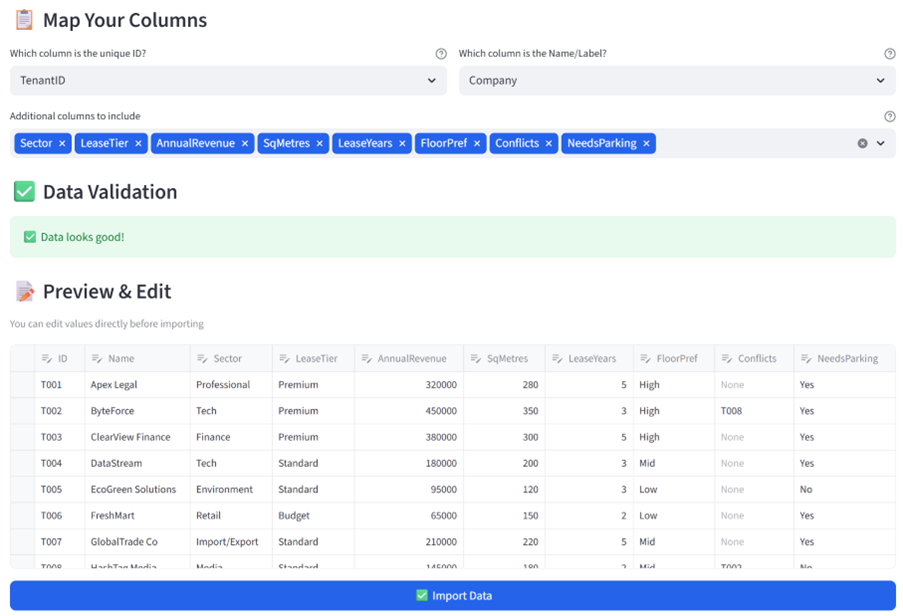
Step 1: Upload your tenant register
Your existing leasing spreadsheet. Company names, sectors, lease tiers, annual revenue, square metre requirements, lease terms, floor preferences, conflict flags, parking needs. CSV or Excel.
Step 2: Set your rules
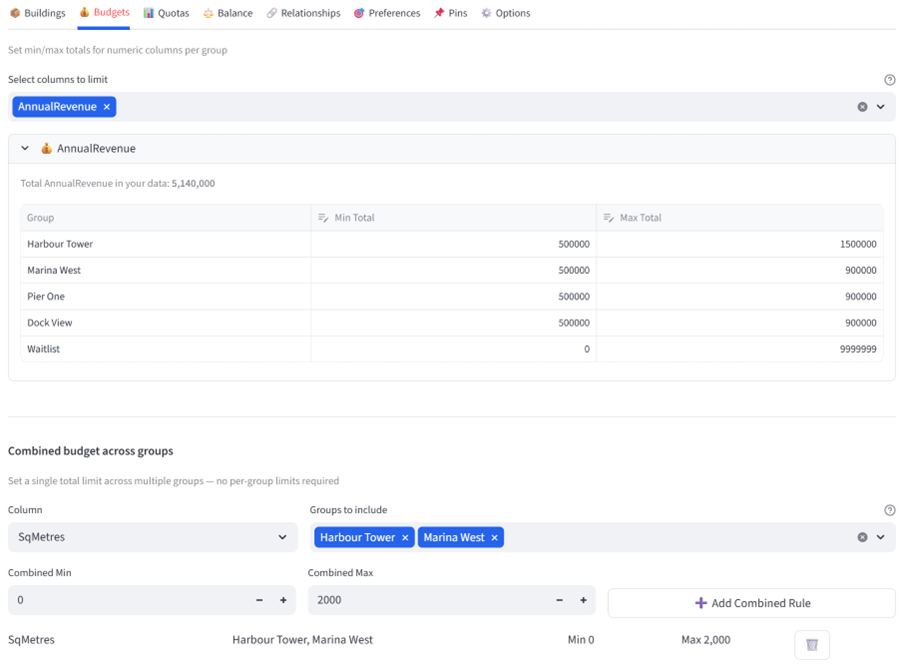
Five groups: four buildings plus a Waitlist with the Flex flag ticked so it absorbs overflow. Tag Harbour Tower and Marina West as “SharedSite” for the combined parking budget. Tag all four real buildings as “Active” for sector balancing. Revenue floor of $500K per active building. Combined square metre budget of 2,000m² across the shared site. Lease tier balance across active buildings only. Preferences steer premium tenants toward Harbour Tower and tenants who don’t need parking toward the shared-site buildings.
Step 3: Get your allocation
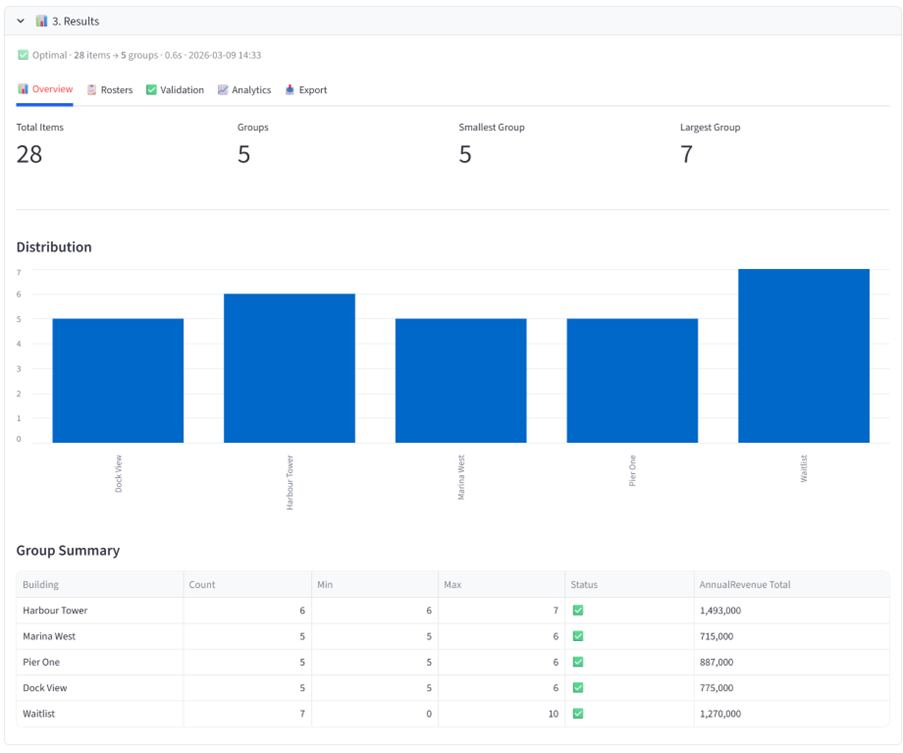
Harbour Tower has the premium tenants and the highest revenue. Marina West complements it without exceeding their shared 2,000m² footprint. Pier One and Dock View are balanced by sector and tier. The waitlist holds 3–5 tenants who didn’t fit the constraints — and you can see exactly why each one landed there.
Step 4: Prove it’s defensible
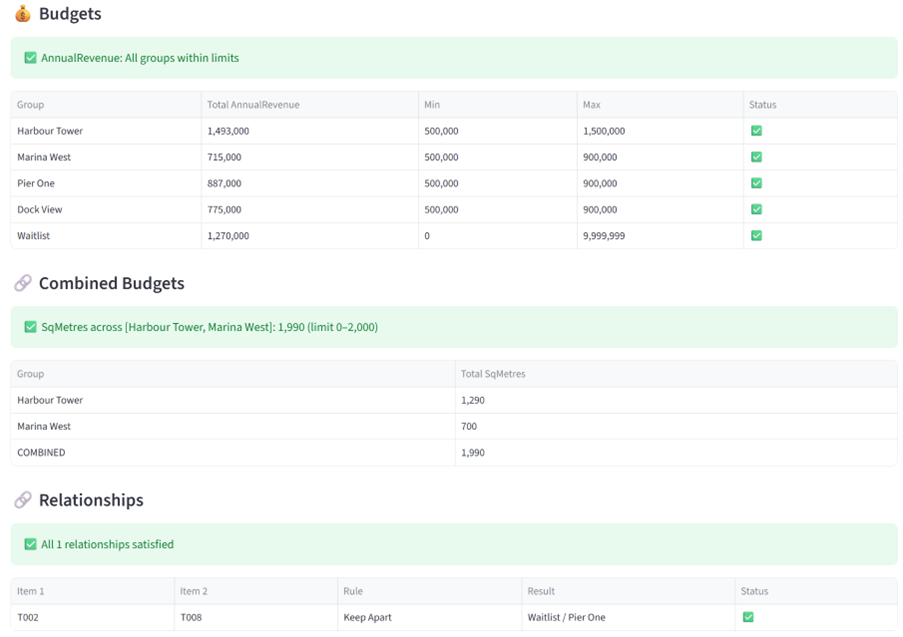
The Validation tab confirms every revenue floor is met, the shared parking constraint passes, sector balance is achieved, and conflicts are separated. The Analytics tab shows revenue distribution, sector coverage, and square metre allocation across all buildings. Export the Excel report for the leasing committee — every constraint is documented.
The result
Without Balanced Allocate: a week of back-and-forth between the leasing manager and building owners, a placement that quietly overloads the shared parking, and a waitlist that looks suspiciously like “tenants the manager didn’t want.” No audit trail. No explanation for the tenants who missed out.
With Balanced Allocate: one coordinator, fifteen minutes, every building commercially viable, the shared parking respected, and a waitlist that exists because the constraints demanded it — not because of personal preference. The leasing committee gets a report, not an opinion.
Not just commercial leasing
The same overflow and shared-resource patterns work anywhere you need to select, place, or shortlist under competing constraints:
- Co-working floor plans: Distribute 80 member companies across 6 floors balanced by industry, noise level, and meeting room access — with a waitlist for overflow
- Market stall allocation: Place 50 vendors across 4 zones balanced by product type, with shared power constraints between adjacent zones
- Student housing: Allocate 200 students across 8 residential blocks balanced by faculty, year level, and dietary needs, with shared kitchen capacity limits
- Shopping centre tenancy: Place 30 retailers across 3 levels with sector diversity, anchor tenant positioning, and shared foot-traffic constraints
- Industrial park leasing: Allocate 40 businesses across 6 sheds balanced by industry type, power draw, and noise rating with a structured waitlist
- Graduate hiring: Shortlist 20 candidates from 150 applicants across 6 business units, balanced by degree type, university, and gender — within a total salary budget of $1.8M
- Co-working floor plans: Distribute 80 member companies across 6 floors balanced by industry, noise level, and meeting room access — with a waitlist for overflow
- Contractor panel refresh: Select 12 pre-qualified contractors from 40 applicants balanced by trade, region, and insurance tier — with incumbents weighted but not guaranteed
- Internal team restructure: Redistribute 90 staff across 5 new teams balanced by seniority, skill set, and location — with a redeployment pool for roles being made redundant
- Equipment allocation: Assign 60 laptops across 4 departments balanced by spec tier, warranty status, and age — with a decommission group for units past end-of-life
- Conference sponsorship tiers: Place 25 sponsors across Gold, Silver, and Bronze tiers balanced by industry, with revenue floors per tier and a waitlist for late entries
Try it yourself
Download the Balanced Allocate User Guide with this, plus additional full examples, walkthroughs, constraints and dataset formats. The data used in this example is also available for download below.
Your data stays in your browser session. Nothing is stored on our servers.
Ready to stop rearranging sticky notes?
Start Free Trial — 14 days free, no credit card.